Do you want your business or organization at the top in search results, including AI-powered search? If so, this post will help your content development and online strategy.
🔄 Updated November 2025: This post has been expanded to include AI search optimization, covering AEO (Answer Engine Optimization), GEO (Generative Engine Optimization), and LLM SEO so your content strategy covers both traditional search engines and AI platforms like ChatGPT, Google AI Overviews, Perplexity, and Claude.
What is SEO?
When you write text for SEO, it’s important to understand what SEO is.
SEO stands for “Search Engine Optimization.” It is the process of optimizing your website’s text and metadata in order for search engines like Google to rank the value of the content on a page of your website.
Important areas of your page content to focus on for SEO.
- Page Title
- The first sentence in the first paragraph of the page
- Headers and Sub-headers
- Image Alt Text & Description (hidden text seo)
- Word Count: our guideline is 1200 words or more (Google sets no minimum)
- Page Description (what shows in previews of the page on social media)
- Add a Table of Contents
- Structured Data and Schema Markup (for AI and answer engines)
- Clear, Direct Answers to common questions (for AEO and GEO visibility)
How do we write text for SEO?
Whether you draft your content directly in your website, or in a text editor like Apple Pages, Google Docs, or Microsoft Word, this guide will help you write text for SEO using best practices.
Learn how to use Google Drive for your website content.
Start with the Page Title
When optimizing your website for search engines, start with your page title.
Your page title should incorporate your targeted keyword and be coded as an H1 tag (header 1) for optimal visibility and relevance.
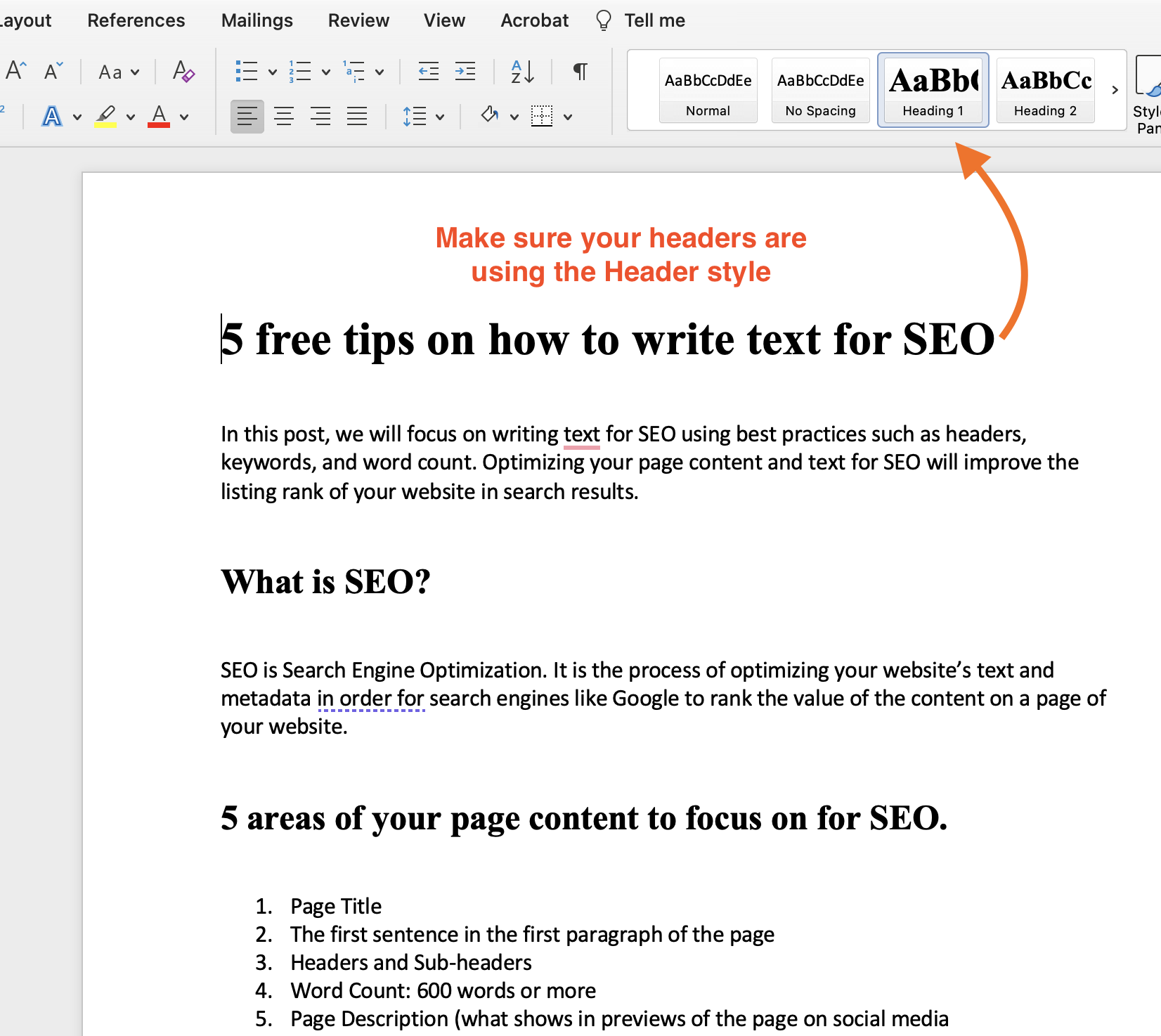
When crafting your content for a blog post, product page, or any other section of your website, use the appropriate header styles in your text editor so search engine crawlers interpret your content correctly and your website displays it effectively.
This means applying the Header Style feature rather than manually adjusting the text appearance. While it might seem like a small detail, proper styling ensures that your content retains its structural integrity when transferred to your website’s backend.
Without this attention to detail, the intended hierarchy of headers, from H1 to H6, may not be preserved, potentially impacting your site’s SEO performance and overall user experience.
So, remember, when working on your website text, always prioritize proper formatting and styling to maximize its SEO potential and enhance the readability and navigability of your web pages.
First Things First
Now that you have the keyword in your page title and your page is showing that title as an H1 tag, we need to include your keyword in the very first sentence of your first paragraph. This can be done in whatever way it sounds natural. You might start with the keyword, include it in the middle of the first sentence, or end the first sentence with the keyword.
Here are examples using this page’s “text for SEO” as the keyword:
- When you write text for SEO, it’s good to understand what SEO is.
- To write text for SEO, you’ll first start with the Page Title
- Your page’s SEO works better when you write text for SEO as your goal.
Include headers and sub-headers in your Text for SEO
Headers and sub-headers help your SEO and make your page easier to read and use.
By strategically implementing headers, such as H1 (only for page title), H2, and H3 tags, you signal to search engines like Google that your page contains valuable and organized content, thereby increasing its chances of ranking higher in search results.
These headers serve as signposts, guiding both search engine crawlers and site visitors through the hierarchy of information on your page.
They also break the content into digestible chunks, making it easier for readers to find the information they are interested in.
This ability to “scan” the page quickly for relevant details improves user engagement and satisfaction. When using subheaders, such as H2 and H3 tags, it’s essential to incorporate relevant keywords wherever possible.
Keywords in subheaders reinforce the semantic relevance of your content and help search engines understand the context of each section.
By aligning your header structure with your target keywords, you create a more cohesive and SEO-friendly page that resonates with both search algorithms and human readers alike.
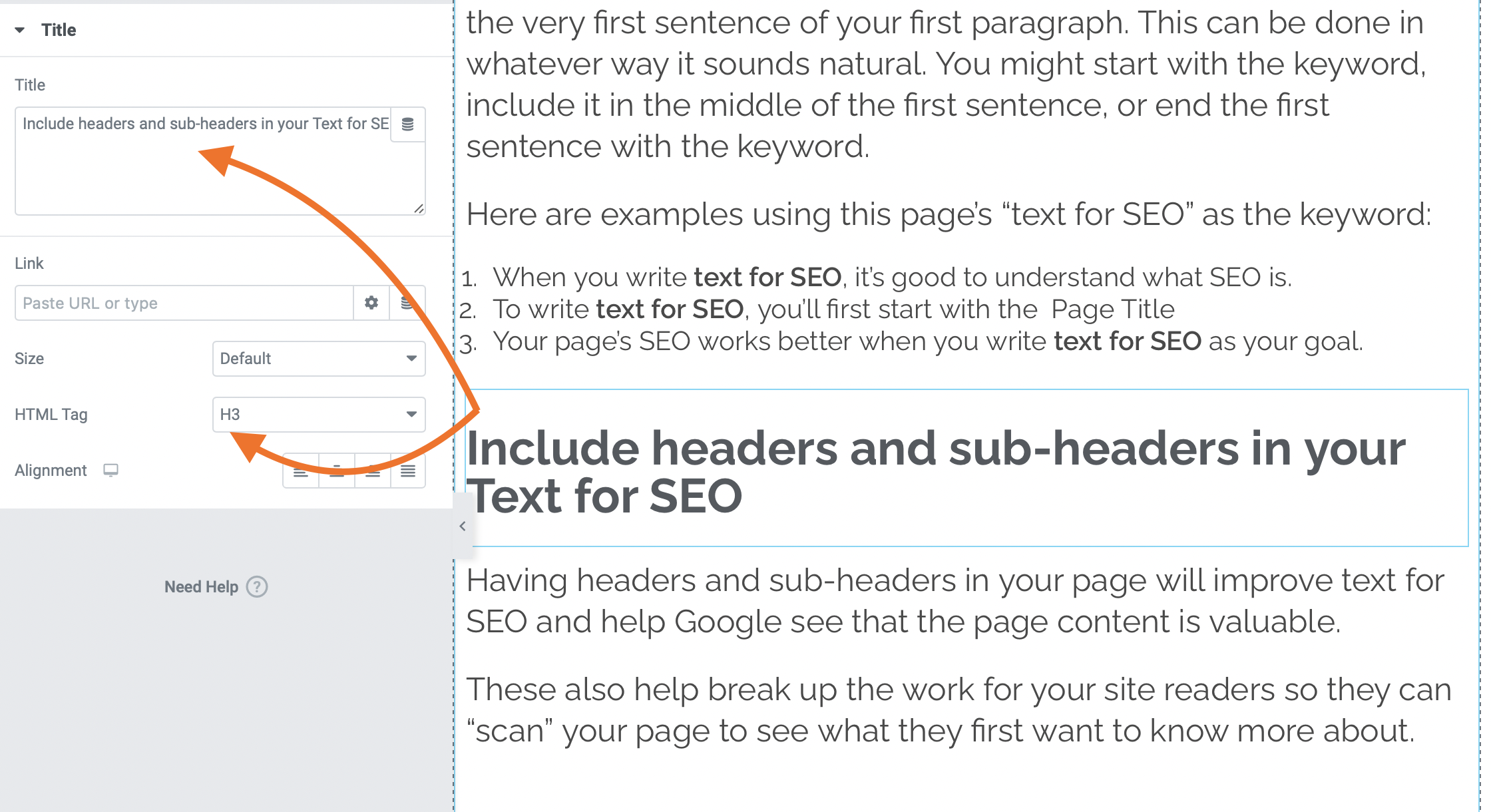
Image Alt Text, Description, and Caption
This is considered “hidden text SEO” because you can’t actually see it in the content of the page.
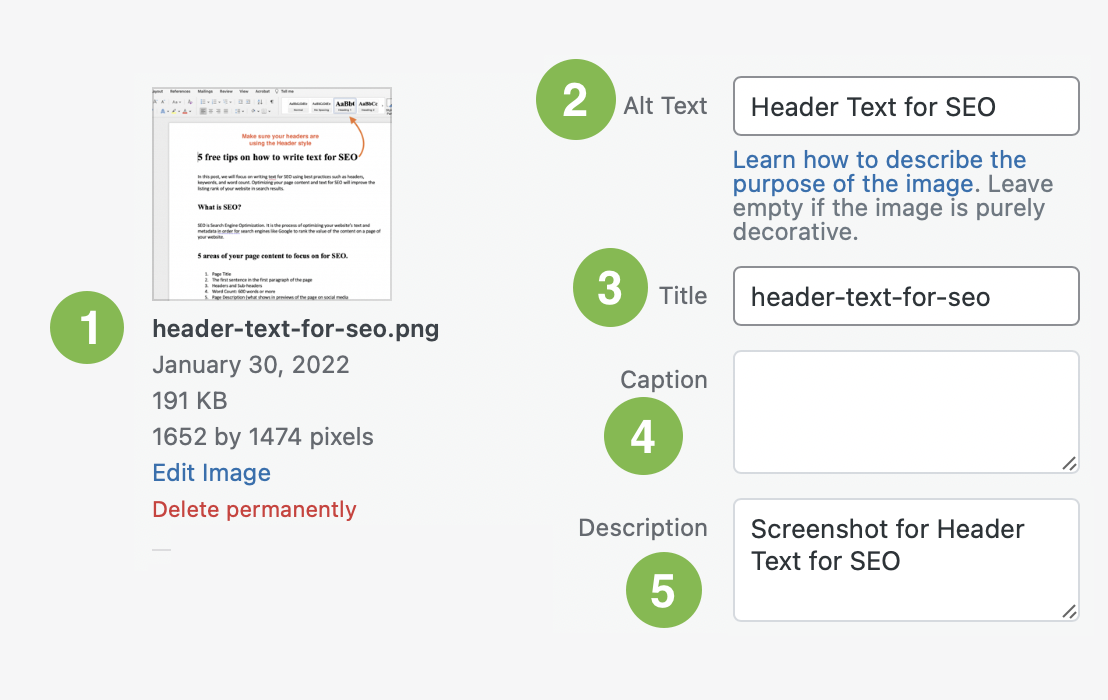
- Image filename
- Alt Text
- Image Title
- Caption
- Description
The 5 Ways To Include Keywords In Image Meta Data
When adding images to your page, be sure to include your keyword into the Alt Text (2) and the Description (5) of that image.
This will help with website content relevance. The alt text is what shows if the image doesn’t load, and for screen readers. And the Description should explain what the image is… such as a screenshot, a dog, or a chart about the quality of Star Trek shows.
Most “About” pages include the organization’s teams and bio photos. Be sure to include the person’s name in the Alt Text and a description such as “Photo of Jane Doe, CEO of Everywhere.”
- Learn which image file types to use for websites, including the difference between a JPG and a PNG.
- Learn how to add Alt Text in your images in WordPress on WP Engine’s documents.
If your image includes a caption (text under-and-connected-to), be sure that it’s related to the file name of the image, the Alt Text, and the Description.
Word Count: Our 1200-Word Guideline
Google has no minimum word count. Its SEO Starter Guide says the length of content alone doesn’t matter for ranking purposes.
Our guideline is 1200 words or more, because that usually leaves room to cover a topic with depth and breadth for both users and search engines. However, achieving this word count should not sacrifice readability or user experience. Therefore, it’s essential to follow certain guidelines to optimize the length and structure of your content effectively.
Extra Tips About Page Content-Length
Keep your sentences short and easy to read.
Firstly, keep your sentences concise and straightforward, avoiding excessively long or convoluted constructions that can confuse readers and dilute your message.
We know you are smart but stick with commonly used words and phrases in your explanation of things.
While demonstrating your expertise is important, prioritize clarity by using commonly understood words and phrases, rather than overly technical jargon or obscure terminology. This ensures that your content remains accessible and engaging to a wider audience.
Keep paragraphs no more than 4 or 5 sentences long. Adding some line breaks will help your reader’s eyes.
Break up your content into manageable chunks by limiting paragraph length to no more than 4 or 5 sentences. Use line breaks and white space to create visual breathing room, making it easier for readers to digest the information and move through your content.
By adhering to these best practices, you can strike the right balance between quantity and quality in your webpage’s text content, maximizing its SEO potential while enhancing the overall user experience.
Page Description
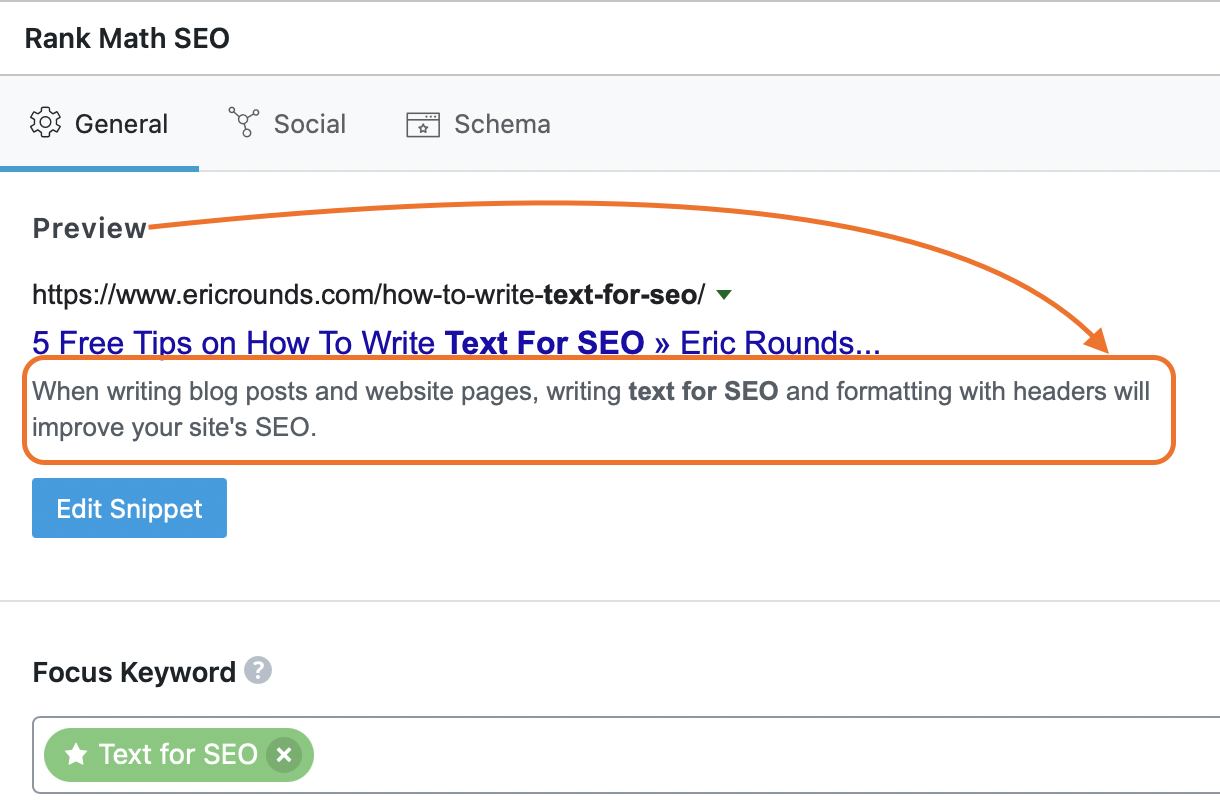
Your page description can show in search results and social media post previews, so it shapes whether people click through to each page.
This snippet of text serves as a teaser for users in search engine results, providing a concise preview of the page’s content and enticing them to click through.
Google has said it doesn’t use the description meta tag in ranking, so write it for people: its job is to earn the click.
Optimize this part of your website’s metadata page by page. By default, search engines often use the “excerpt text” or a snippet from the page’s content as the preview text in search results.
SEO tools like Rank Math let you customize this preview text to fit your optimization goals, so your page descriptions capture attention and match the searcher’s intent.
Whether it’s highlighting unique selling points, addressing common pain points, or incorporating targeted keywords, a well-written page description gives searchers a reason to choose your result.
Add a “Table of Contents”
Much like the convenience of your text editor providing an outline of your document through the use of text headers, incorporating similar functionality into your website pages or blog posts can greatly enhance user experience and SEO performance.
This is a Table of Contents like what you see on this page, and WordPress Elementor offers a widget to add one to your pages.
This can be achieved by using H2, H3, or H4 tags to create sub-dividers within your page content, effectively organizing and structuring the information for easy navigation and comprehension.
Segmenting your text into distinct sections makes it easier to read and breaks up long blocks of content. This deliberate structuring encourages users to engage with your content more effectively, improving both retention and satisfaction.
The content you create for your website serves a specific purpose, whether it’s providing valuable insights, practical guidance, or entertaining narratives.
That purpose matters for SEO, which rewards relevance and quality. While it’s tempting to indulge in creative endeavors like fan-fiction, focus on valuable and informative content to attract and retain your target audience.
A table of contents on your web pages also makes them easier to scan and navigate, and its anchor links give each section its own address you can link to directly.
Structuring your website text this way improves the user experience and supports your SEO, which drives visibility and engagement for your online presence.
Search Has Changed: Writing for AI in 2026
Everything above still matters. Traditional SEO is the foundation of your online visibility, and the ways people search for information have expanded on top of it.
Today, many people get their answers directly from AI platforms like ChatGPT, Google AI Overviews, Perplexity, and Claude without clicking a traditional search result. In a Pew Research Center study, Google users who saw an AI summary clicked a traditional result in 8% of visits, compared with 15% when no summary appeared. When someone asks an AI assistant a question about your industry, your service, or your area of expertise, your content either shows up in that answer, or it doesn’t.
The same principles of clear, well-structured, genuinely helpful content that make traditional SEO work still apply. Google says the best practices for SEO remain relevant for its AI features, and we write for every AI platform the same way, starting from strong brand clarity and solid content.
What is AEO (Answer Engine Optimization)?
AEO stands for Answer Engine Optimization. It is the practice of structuring your content so that search platforms can directly provide your information as the answer to a user’s question, rather than just listing your page as one of many links.
You’ve likely seen this already. When you search a question on Google, that highlighted box at the top with a direct answer? That’s a featured snippet, and getting your content there is the core of AEO. Google’s AI Overviews take this even further by synthesizing answers from multiple sources and presenting them before any traditional results.
AEO also applies to voice search. When someone asks Siri, Alexa, or Google Assistant a question, the device reads back one answer. If your content is structured for AEO, you have a much better chance of being that answer.
How to write for AEO:
- Answer questions directly. If your page topic is a question people ask, answer it clearly in the first 1 to 2 sentences of that section. Front-load the answer, then expand.
- Use FAQ sections. Add a Frequently Asked Questions section to your pages. Each answer becomes a short, self-contained passage that a search engine or an AI tool can quote.
- Add structured data (Schema Markup). This is code your developer adds behind the scenes that tells search engines exactly what your content represents: FAQs, how-to steps, business info, reviews, and more. It gives Google explicit clues about the meaning of a page, though Google says no special schema is needed to appear in its AI features.
- Keep answers concise and factual. We write each answer to be clear, specific, and free of filler.
What is GEO (Generative Engine Optimization)?
GEO stands for Generative Engine Optimization. If AEO is about being the answer in search results, GEO is about being cited and recommended by AI platforms like ChatGPT, Perplexity, Claude, and Google Gemini when they generate responses to user questions.
Traditional search shows you a list of pages to visit. AI search reads those pages for you and delivers a synthesized response that cites only some of them; GEO is how you become one of them.
We think this matters because when an AI platform mentions your brand by name in an answer, it carries an implicit endorsement that no organic search listing can match. The user didn’t have to click through ten results and decide, because the AI already chose you as the authority.
How to write for GEO:
Most AI platforms don’t publish how they choose sources, so this list is how we write, with links where Google or a study says more.
- Create genuinely helpful, original content. Offer unique insight, original data, or expert perspective. Google’s guidance for its generative AI features warns against content that recycles what others on the internet have already said.
- Be the expert source. Include real examples, case studies, and specific frameworks from your experience, so your content can be attributed to a credible authority.
- Focus on topics. Cover related subtopics thoroughly rather than targeting isolated keyword phrases.
- Keep content fresh. An Ahrefs study of 17 million citations found that AI assistants cite fresher content than traditional search results do, with ChatGPT the most likely to cite newer pages. Update your important pages regularly with new data, insights, and a clear “Last updated” date.
- Build your brand presence across the web. Earn genuine mentions on other authoritative sites, industry publications, and directories; we treat them as trust signals. Google cautions that seeking inauthentic mentions isn’t as helpful as it might seem.
What is LLM SEO?
You may also hear the terms LLM SEO, AI SEO, or LLMO (Large Language Model Optimization). These are all variations of the same idea: optimizing your content so that large language models can find, understand, and reference it.
Think of it this way:
- SEO = Optimizing for search engines (Google, Bing) to rank your pages
- AEO = Optimizing for answer engines to feature your content as a direct answer
- GEO = Optimizing for generative AI platforms to cite your content in their responses
- LLM SEO = The umbrella term for making your content work across all AI-powered discovery
The terminology is still evolving, and the strategy matters more than the acronym. Your content needs to be clear, structured, authoritative, and genuinely useful so that both traditional search engines and AI platforms recognize it as a trustworthy source.
How SEO, AEO, and GEO Work Together
SEO, AEO, and GEO are layers, and each one builds on the last:
SEO is your foundation. Solid SEO (proper headers, keywords, fast loading, mobile-friendly design, quality backlinks) is what AEO and GEO build on. Google says the same foundational SEO best practices apply to its AI features, and a page must be indexed and eligible to show in Google Search with a snippet before it can appear as a supporting link in AI Overviews or AI Mode. If Google can’t find and understand your pages, its AI features won’t surface them either.
AEO is your next layer. Once your SEO foundation is solid, structure your content so it can be pulled as direct answers. Add FAQ sections, use schema markup, and write clear answers to the questions your audience is asking. This gets you into featured snippets, AI overviews, and voice search results.
GEO is your forward investment. Create original, expert content that AI platforms have a reason to cite over competitors. Build brand visibility across authoritative sites. Keep your content updated. This positions your brand to be recommended when people ask AI assistants for help in your area of expertise.
The brands that win in 2026 and beyond work on all three, weighted by their goals, their budget, and how ready their content is today.
AI Search Content Checklist
Use this checklist alongside the SEO best practices above to make sure your content is ready for both traditional and AI-powered search:
- Does your page directly answer a question your audience is asking? Front-load clear answers at the beginning of relevant sections.
- Does your content include FAQ sections? Add structured Q&A blocks that AI can easily parse and extract.
- Is your content original and expert-driven? Include your own experience, examples, case studies, or frameworks.
- Is structured data (Schema Markup) implemented where it fits? Ask your developer to add Organization and Article markup. It helps search engines read the page, though Google does not require it for its AI features.
- Is your content up to date? Add a “Last updated” date and refresh important content at least quarterly.
- Does your brand appear on other authoritative sites? Earn mentions through guest posts, partnerships, directories, and industry publications.
- Is your content written for clarity over cleverness? Plain language and a direct answer are easier for people to act on and easier for any system to quote.
If you already follow the SEO best practices in this post, you are well on your way. Most of what makes content AI-ready is the same thing that makes it effective for people: clarity, structure, and genuine helpfulness.
Why Brand Clarity is the Real Foundation
SEO, AEO, and GEO share one dependency: none of these strategies work well without brand clarity.
If your messaging changes every quarter, if you can’t clearly articulate what makes your business different, if your website reads like a collection of disconnected pages rather than a cohesive story, then no amount of optimization will fix your visibility problem.
We think AI answers favor brands with consistent, clearly defined expertise. That expertise comes from knowing who you are, what you offer, and who you serve, and communicating that consistently across every page of your site and every mention of your brand online.
Brand strategy is what gives your SEO, AEO, and GEO efforts something durable to amplify, so start there.
More About Headers
How to apply the Header Style (making your text bold and larger does not make it an actual “header”)
Your text editor like Pages or Google Docs offers Header specific styling options. Be sure to use your text editor’s Styling option to apply the Header style where needed, using the links below to “See How” for your text editor.
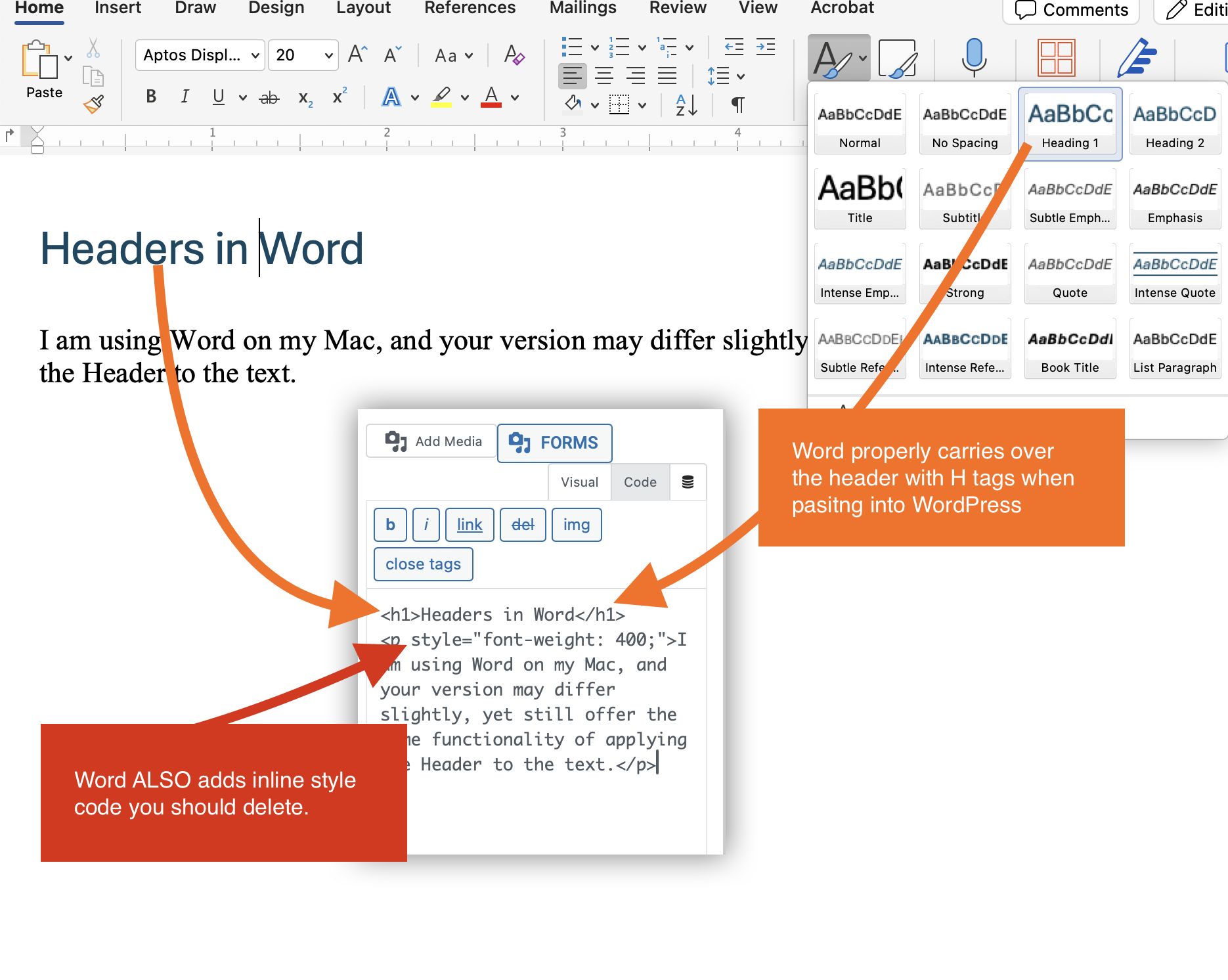
Headers in Word
We are using Word on our Mac, and your version may differ slightly, yet still offer the same functionality of applying the Header to the text.
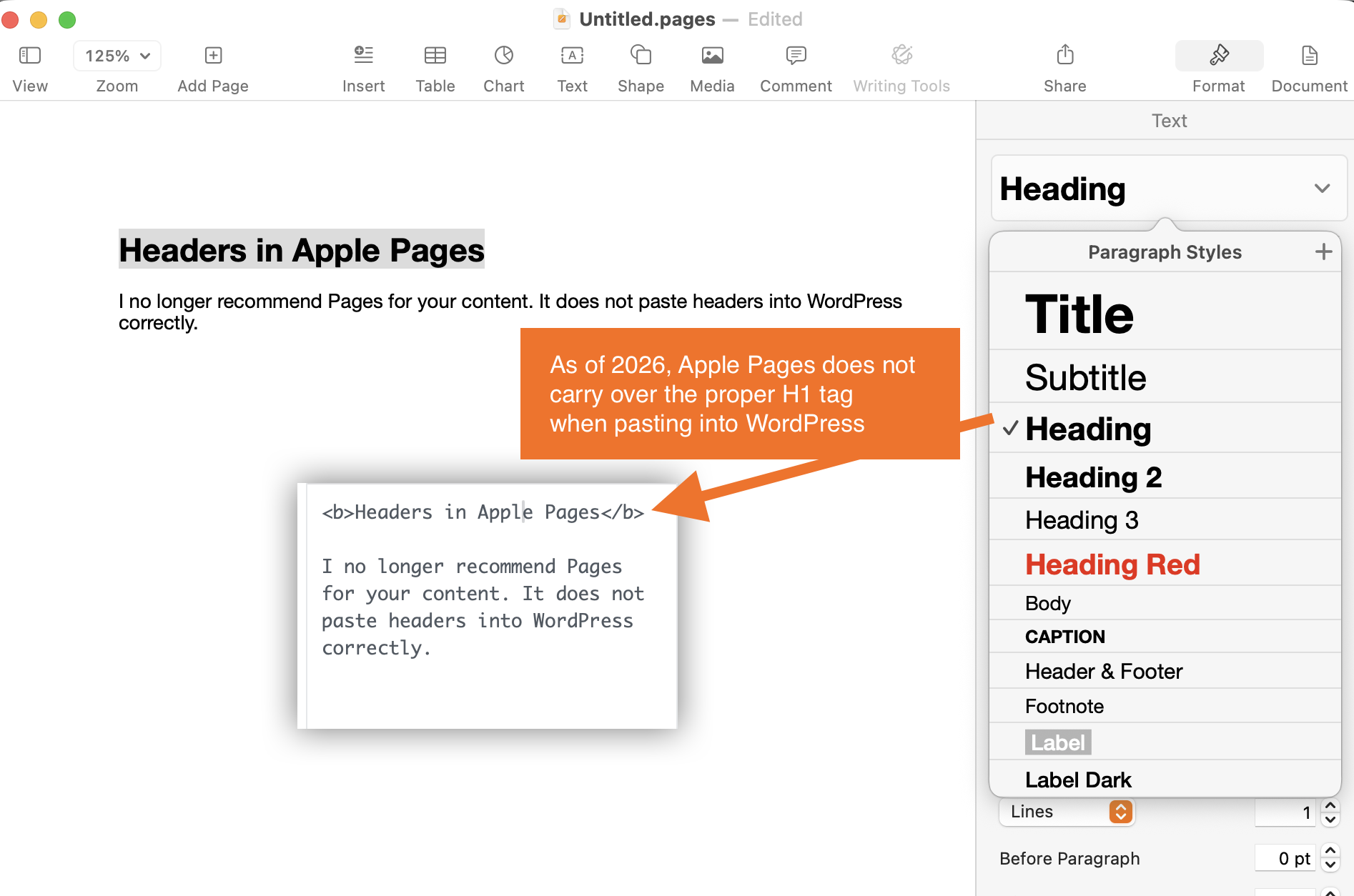
Headers in Apple Pages
We no longer recommend Pages for your content, because it does not paste headers into WordPress correctly.
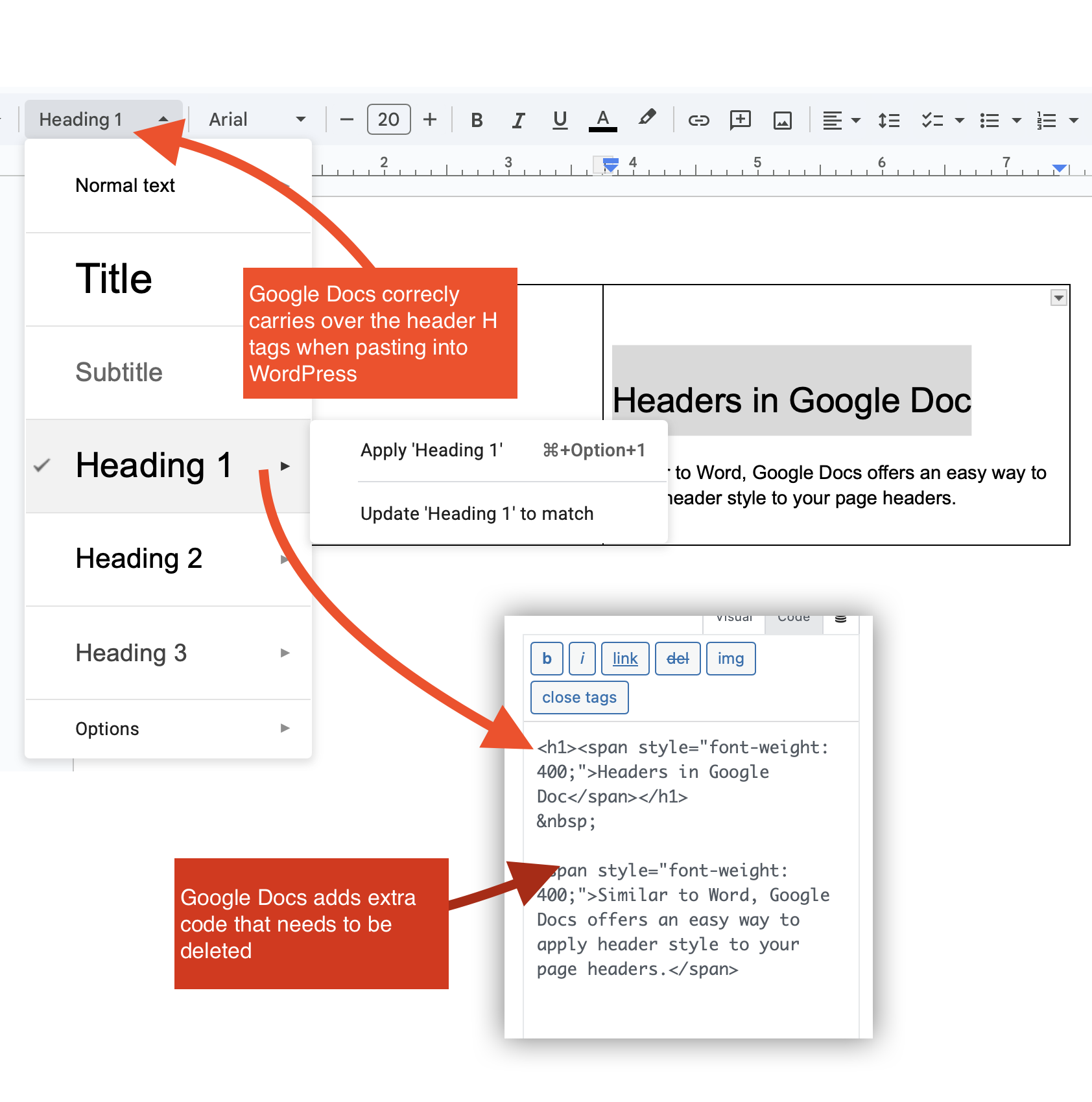
Headers in Google Doc
Similar to Word, Google Docs offers an easy way to apply header style to your page headers.
Headers in WordPress
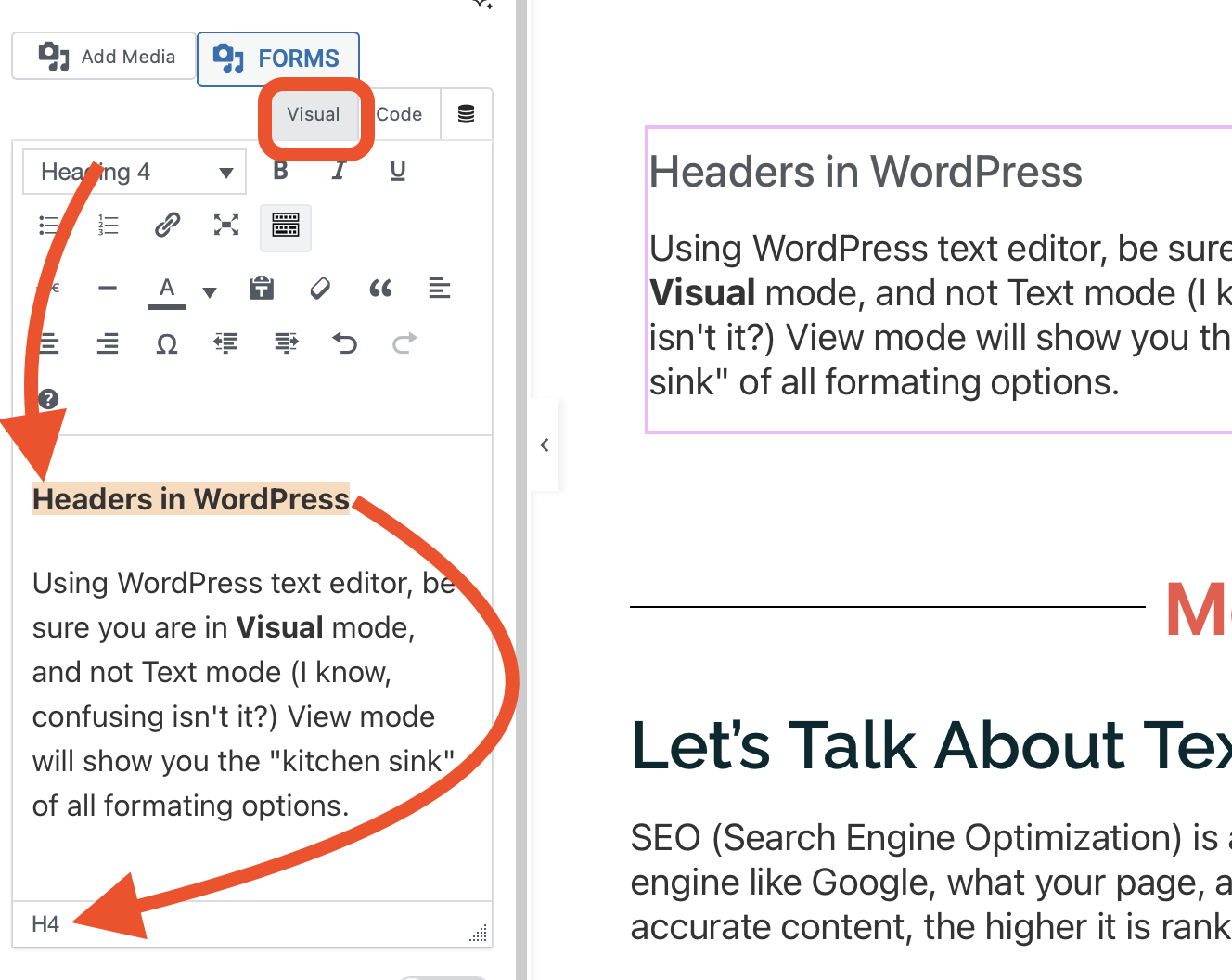
Using WordPress text editor, be sure you are in Visual mode, and not Text mode (we know, confusing isn’t it?) View mode will show you the “kitchen sink” of all formating options.
Let’s Talk About Text
SEO (Search Engine Optimization) is a complex and required aspect of a website. It tells the search engine like Google, what your page, and your whole website, are about. The higher quality and accurate content, the higher it is ranked towards the top of the search results.
Be sure that you write your blog posts and website content with the following in mind:
Power Word
A Power Word is something Intriguing, Emotional, or Sensory… like FREE, Exciting, or Mouthwatering Pizza. Adding the appropriate power word to your page title can make it more inviting to click.
Page URL & Page Title
For example, if your Title is “5 Free Tips on How To Write Text For SEO” then the link to it should match or at least include the keyword(s) … website.com/how-to-write-text-for-seo/
Headers Contain Keywords
The H1 (Header One) is almost always the title of the page, and should be used only once on a page. The H2 and H3 are described above. Always include your keyword or phrase in your headers. If you need help writing quality headlines, read Your Headlines Suck, and Here’s Why.
Keywords in Body Text
Be sure that when you use your keywords, you include them with purpose. Stuffing a page with keywords is so 1997, and search engines are smarter now.
1200 Words+
It’s not as difficult to write a blog post or web page with 1200 words or more. Simply create the outline of what is important, what is needed to share with your reader… and then fill in with conversational and relevant text so that it reads easily. If you need more text, include what will happen if the opposite is done, or how what you wrote has helped you or your clients.
Include links
The value of your page is how it connects to other pages. Ask your associates to link to your page, and offer a way for you to link to theirs in your post. For example, here is an article exactly that talks about Why Links Are Important for SEO. See how easy that was?
Include links to other pages on your website. Links in text content are different than the links in your menu navigation. Linking to your own content also helps to have “sticky” site visitors. For example, if you need and want help with your site content, here’s an article to help you with that.
Key Words in Excerpt
Your page excerpt is also the preview you see on social media links like Facebook. It’s also the preview you will see on blog landing pages. Consider it like the synopsis and essence of what your page is about.
Accessibility for Websites
Google uses the mobile version of your pages for indexing and ranking, so check that your site is mobile-friendly. Google’s Lighthouse tool also gives every page an accessibility score that flags common barriers for visitors. Make sure your website is accessible for all site visitors with this convenient checklist to verify the accessibility requirements for your website.